Advance Git & GitHub for DevOps Engineers: Part-2

✅Introduction💥
The "Git stash" command is used in Git version control to temporarily save the files. This command allows the users to save unfinished work Changes that you have made to your working directory but do not want to commit immediately.

Use of Git stash command:
Save Changes: To stash your changes, run:
git stash save "message"
Check Stash List: You can view your list of stashes using:
git stash list
Apply Stash: To apply your stashed changes back to your working directory, use:
git stash apply stash{n}
Replace n with the index of the stash, you want to apply.
Pop Stash: If you want to apply and remove the stash from the list at the same time, you can use:
git stash pop stash{n}
Drop Stash: If you decide you no longer need a particular stash, you can remove it from the stash list:
git stash drop stash{n}
Clear Stashes: To clear all stashes, you can use:
git stash clear
The "Git cherry-pick" command in Git is used to apply the changes of a specific commit to your current branch. This can be useful when you want to pick and apply only certain commits from one branch onto another, without merging the entire branch.
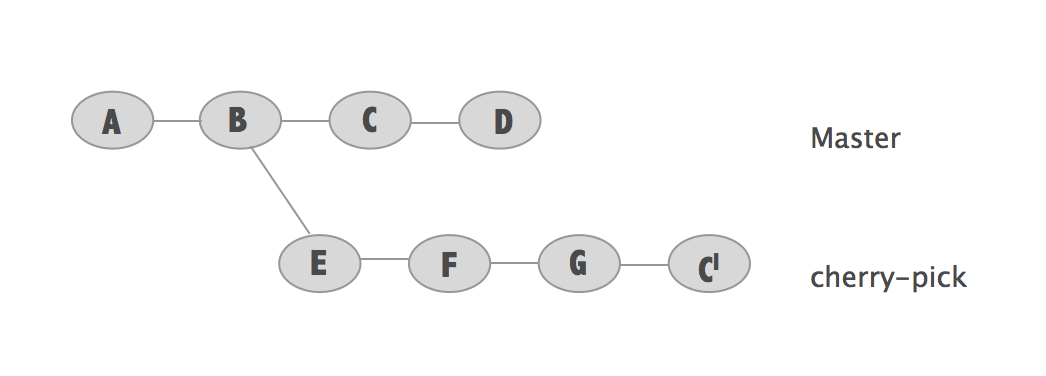
Use of Git cherry-pick command:
Switch to the Target Branch: Make sure you're on the branch where you want to apply the changes.
git checkout target-branch
Cherry-Pick the Commit: Use the following command to apply the changes from the desired commit onto the current branch:
git cherry-pick commit-hash
Resolve Conflicts (if any): If there are any conflicts during the cherry-pick process (when the same lines were modified in both the source and target branches), you'll need to resolve these conflicts manually. After resolving conflicts, continue the cherry-pick process by running:
git cherry-pick --continue
✅Task-01
Create a new branch and make some changes to it.
Use git stash to save the changes without committing them.
Switch to a different branch, make some changes, and commit them.
Use git stash pop to bring the changes back and apply them on top of the new commits.
step1:to create branch command is:
git branch <branch name>
step2:create a file, do some changes in the file, add it to Git and perform stash command:
vi file1.txt
git add file1.txt
git stash
step3:switch to another branch command is
git checkout <branch name>
step4:create another file and do some changes to the file, and add it to git.
vi file.txt
git add file.txt
step5:apply and remove the stash from the list command is
git stash pop
step6:then commit it to the git.
git commit -m <add some message>

✅Task-02
In version01.txt of the development branch add the below lines after “This is the bug fix in development branch” that you added in Day10 and reverted to this commit.
Line2>> After bug fixing, this is the new feature with minor alterations”
Commit this with the message “ Added feature2.1 in development branch”
Line3>> This is the advancement of the previous feature
Commit this with the message “ Added feature2.2 in development branch”
Line4>> Feature 2 is completed and ready for release
Commit this with the message “ Feature2 completed”
All these commits messages should be reflected in the Production branch too which will come out from the Master branch (Hint: try rebase).
step1: create a branch called "development" command is
git branch development
step2:create a file "version1.txt" and do some changes to the file and commit Changes to Development.
vi version1.txt
git add version1.txt
git commit -m <add message>
step3:Create a Production Branch from Master:
Switch to the master branch-
git checkout master
Create a new Production branch from master-
git checkout -b production
step4:rebase the production branch onto the development branch to include the commits from development:
git rebase development


✅Task-03
In the Production branch Cherry pick Commit “Added feature2.2 in development branch” and added the below lines in it:
The line to be added after Line3>> This is the advancement of the previous feature
Line 4>>Added a few more changes to make it more optimized.
Commit: Optimized the feature.